🗺️ 系列目录:
-
- K8s系列一:Ubuntu 22.04 从零搭建集群(Flannel + Containerd) 【基础设施】
- K8s系列二:安装 Dashboard – 原生 Web 控制台配置 【官方可视化】
- K8s系列三:安装 Rancher – 企业级多集群管理平台 【企业级管理】👈 当前篇章
- K8s系列四:安装 Kuboard – 国产可视化运维工具 【轻量可视化】
- K8s系列五:Elkeid入侵检测系统 容器 K8s 安全部署与检测 【运行时安全】
- K8s系列六:HarborGuard 容器安全扫描平台部署与实战 【综合扫描平台】
- K8s系列七:NeuVector 容器安全平台部署与实践 【全栈容器安全】
- K8s系列八:三大容器安全平台对比总结(HarborGuard / NeuVector / Elkeid) 【横向对比】
- K8s系列九:Trivy 轻量级安全扫描实战 – 镜像、K8s、代码全覆盖 【CI/CD 集成首选】
📋 文档概述
| 项目 | 内容 |
|---|---|
| 基础环境 | Ubuntu 22.04 LTS / Kubernetes v1.28 / Containerd / Flannel |
| 集群规模 | 3 节点(1 Master + 2 Worker) |
| Rancher 版本 | v2.13.3 |
| 访问域名 | rancher.google.com (使用自己的域名) |
| Ingress Controller | ingress-nginx v1.9.5(hostNetwork 模式) |
| SSL 证书 | cert-manager + Rancher 自签名 |
一、前置准备
✅ 1.1 集群状态确认
# 检查所有节点状态
kubectl get nodes预期输出:所有节点均为
Ready 状态NAME STATUS ROLES AGE VERSION
k8s-master Ready control-plane 5h v1.28.15
k8s-node1 Ready <none> 5h v1.28.15
k8s-node2 Ready <none> 5h v1.28.15🌐 1.2 域名规划
- 域名:
rancher.google.com - 解析说明:需要解析到 Ingress Controller 运行节点(通过后续步骤确定)
- 临时方案:如 DNS 未生效,可修改本地 hosts 文件
⚙️ 1.3 镜像加速确认(谨慎更换)
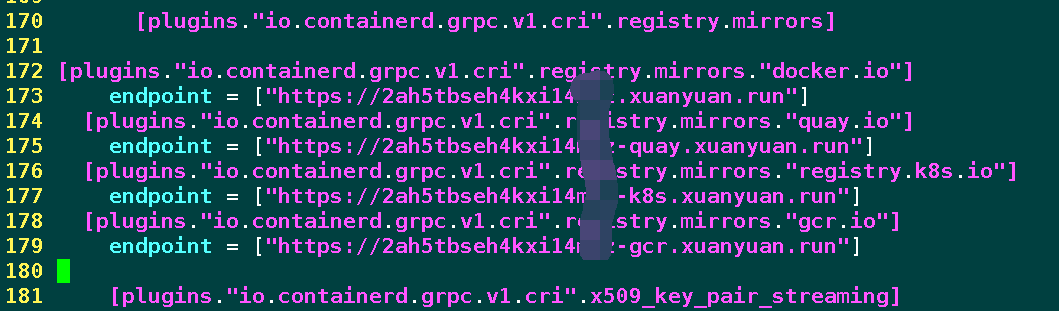
编辑
找到
/etc/containerd/config.toml 【所有节点都要替换,确保镜像源有效,否则可能拉取失败,避免网络受限,我虚拟机通过openwrt 使用了代理】找到
[plugins."io.containerd.grpc.v1.cri".registry.mirrors] 部分,添加3个源:[plugins."io.containerd.grpc.v1.cri".registry.mirrors]
[plugins."io.containerd.grpc.v1.cri".registry.mirrors."docker.io"]
endpoint = ["https://2ah5tbseh4kxi14mlz.xuanyuan.run"]
[plugins."io.containerd.grpc.v1.cri".registry.mirrors."quay.io"]
endpoint = ["https://2ah5tbseh4kxi14mlz-quay.xuanyuan.run"]
[plugins."io.containerd.grpc.v1.cri".registry.mirrors."registry.k8s.io"]
endpoint = ["https://2ah5tbseh4kxi14mlz-k8s.xuanyuan.run"]
[plugins."io.containerd.grpc.v1.cri".registry.mirrors."gcr.io"]
endpoint = ["https://2ah5tbseh4kxi14mlz-gcr.xuanyuan.run"]注意:toml对空格、换行等敏感,尽量挂代理,如果格式有问题,k8s-master 变会成 NotReady,导致后续操作卡住!
重启 Containerd:
systemctl daemon-reload && systemctl restart containerd二、安装 Cert-Manager
Rancher 依赖 cert-manager 自动管理 SSL 证书。
2.1 添加 Jetstack 仓库
#先安装Helm
curl -fsSL https://raw.githubusercontent.com/helm/helm/main/scripts/get-helm-3 | bash

helm repo add jetstack https://charts.jetstack.io
helm repo update
2.2 安装 Cert-Manager(自动安装 CRD)
kubectl create namespace cert-manager

helm install cert-manager jetstack/cert-manager \
  --namespace cert-manager \
  --set installCRDs=true \
  --version v1.14.4
2.3 验证安装
kubectl get pods -n cert-manager -w预期状态:所有 Pod 变为
Running

三、 安装 Ingress Nginx Controller
3.1 部署 Ingress Nginx(baremetal 模式)
kubectl apply -f https://raw.githubusercontent.com/kubernetes/ingress-nginx/controller-v1.9.5/deploy/static/provider/baremetal/deploy.yaml3.2 【关键】开启 hostNetwork(解决端口监听问题)
# 开启 hostNetwork(使 Ingress 直接监听宿主机 80/443)
kubectl patch deployment ingress-nginx-controller -n ingress-nginx \
  --type='json' -p='[{"op": "add", "path": "/spec/template/spec/hostNetwork", "value": true}]'

# 开启兼容的 DNS 策略
kubectl patch deployment ingress-nginx-controller -n ingress-nginx \
  --type='json' -p='[{"op": "add", "path": "/spec/template/spec/dnsPolicy", "value": "ClusterFirstWithHostNet"}]'

# 重启 Pod 使配置生效
kubectl delete pod -n ingress-nginx -l app.kubernetes.io/component=controller
3.3 验证 Ingress Controller 运行节点
kubectl get pod -n ingress-nginx -o wide
3.4 验证端口监听
在 Ingress Controller 所在节点执行:
netstat -tulpn | grep -E ":80|:443"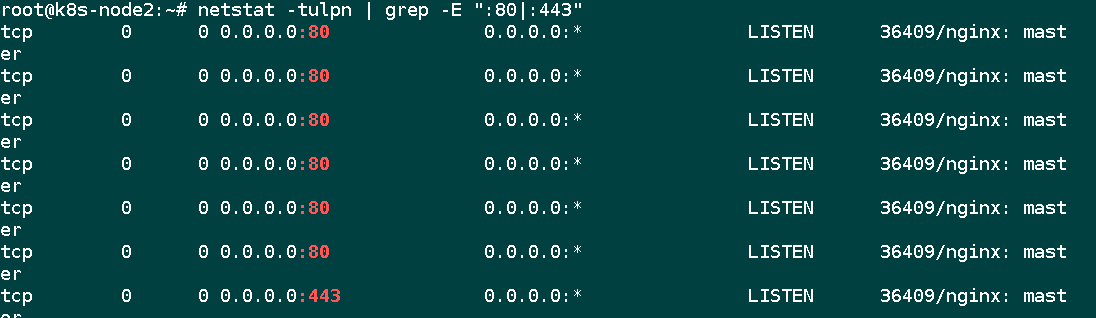
3.5 【踩坑点】检查 IngressClass
# 查看集群中的 IngressClass
kubectl get ingressclass预期输出:
NAME    CONTROLLER             PARAMETERS   AGE
nginx   k8s.io/ingress-nginx   <none>       5m
检查 Ingress Controller 监听的 class 名称:
kubectl describe pod -n ingress-nginx ingress-nginx-controller-* | grep ingress-class预期输出:
💡 踩坑经验:Ingress 资源的
--ingress-class=nginx💡 踩坑经验:Ingress 资源的
ingressClassName 必须与此处一致,否则 Ingress 将不生效,导致访问 404四、 安装 Rancher
4.1 添加 Rancher 仓库
helm repo add rancher-latest https://releases.rancher.com/server-charts/latest
helm repo update
4.2 创建命名空间
kubectl create namespace cattle-system4.3 执行安装命令
helm install rancher rancher-latest/rancher \
  --namespace cattle-system \
  --set hostname=rancher.google.com \
  --set bootstrapPassword=admin \
  --set replicas=1 \
--set ingress.tls.source=rancher参数说明:
hostname:你的访问域名bootstrapPassword:初始密码(首次登录后需修改)replicas=1:单节点模式(适合测试环境)ingress.tls.source=rancher:使用 Rancher 自签名证书
4.4 监控安装进度
kubectl get pods -n cattle-system -w预期过程:
NAME                      READY   STATUS    RESTARTS   AGE
rancher-58dd5bfdc-xxxxx   0/1     Running   0          30s
rancher-58dd5bfdc-xxxxx   1/1     Running   0          2m
rancher-webhook-xxxxx     1/1     Running   0          2m
五、修复 Ingress 配置
5.1 检查 Ingress 状态
kubectl get ingress -n cattle-system问题现象(如果不修复):
NAME      CLASS    HOSTS              ADDRESS   PORTS     AGE
rancher   <none>   rancher.google.com             80, 443   5m
⚠️ 注意:
CLASS 列为 <none>,表示 Ingress Controller 不会处理此 Ingress5.2 修复 Ingress(添加 ingressClassName)
kubectl edit ingress -n cattle-system rancher在
spec: 下添加 ingressClassName: nginx,修改后的 spec 部分应为: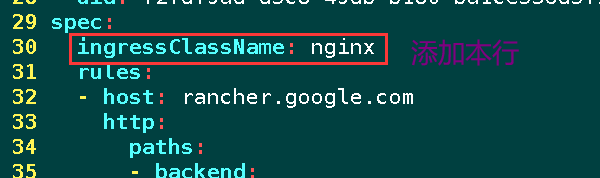
spec:
  ingressClassName: nginx #添加本行
  rules:
  - host: rancher.google.com
    http:
      paths:
5.3 验证修复结果
kubectl get ingress -n cattle-system修复后输出:
NAME      CLASS   HOSTS                ADDRESS          PORTS     AGE
rancher   nginx   rancher.google.com   192.168.20.168   80, 443   11h
六、 DNS 解析与访问
6.1 配置 DNS A 记录
主机记录:rancher
记录值:192.168.20.168(Ingress Controller 所在节点 IP)
6.2 本地 hosts 测试(可选)
如 DNS 暂未生效,可在本机修改 hosts 文件
6.3 浏览器访问
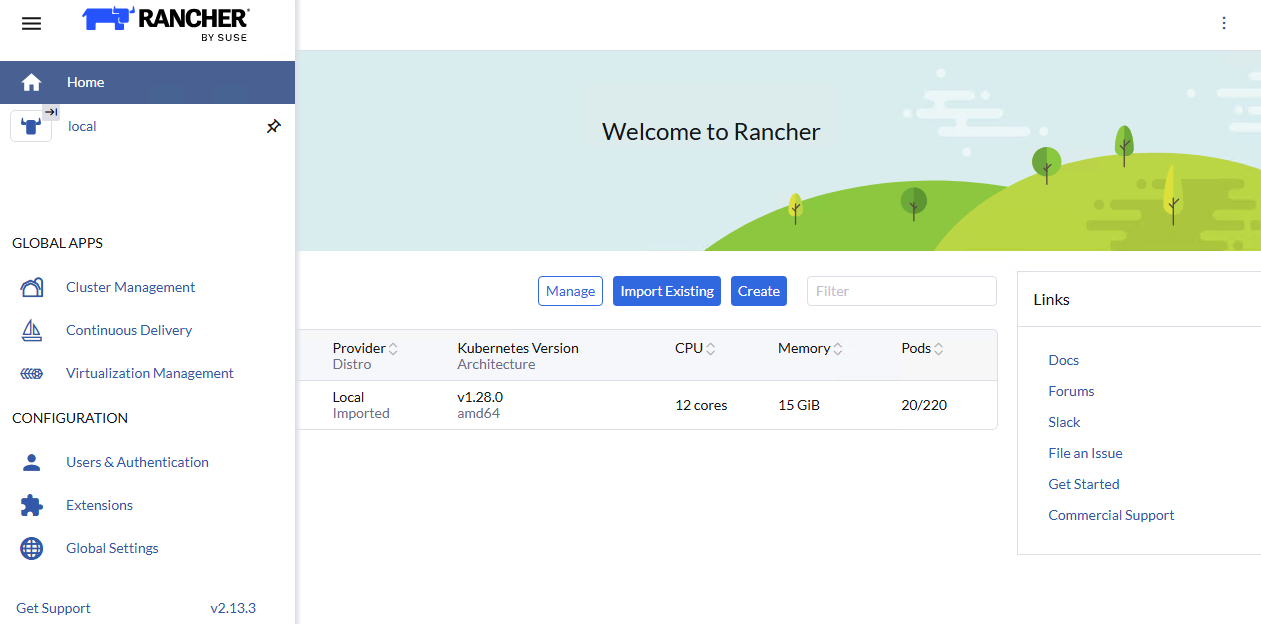
打开浏览器,访问 https://rancher.google.com/
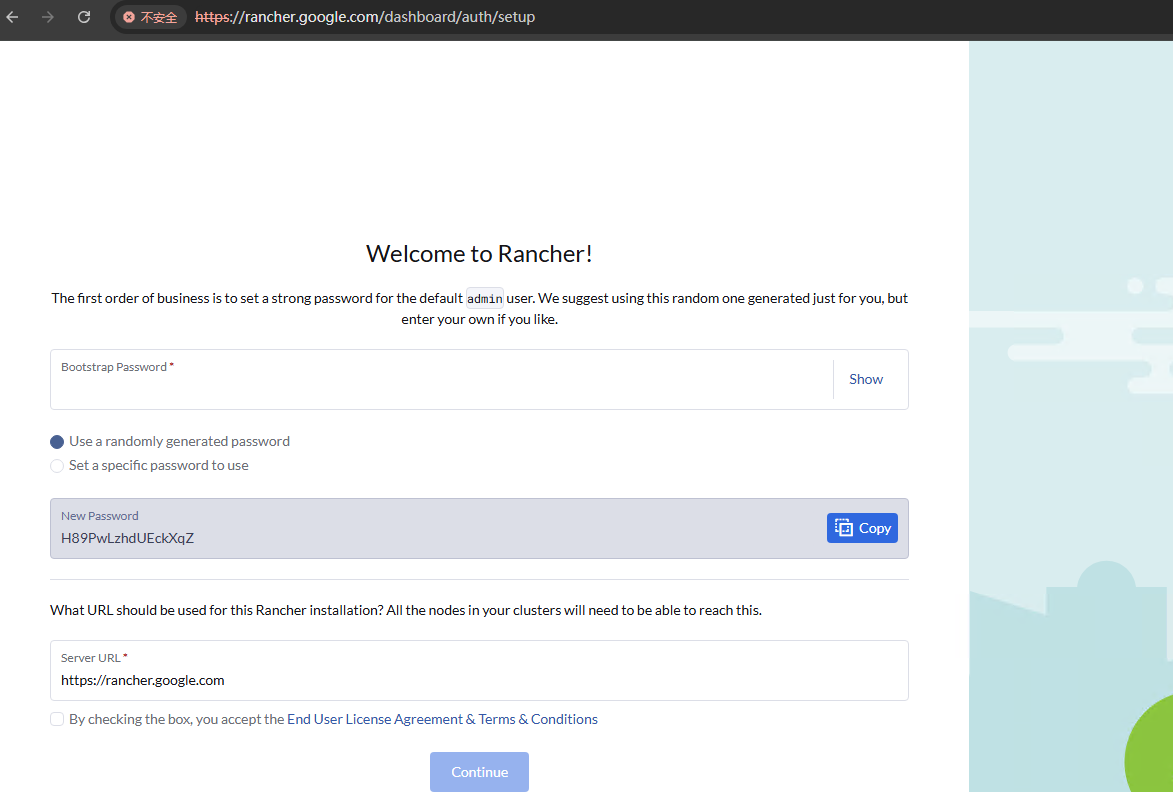
6.4 首次登录
- 用户名:
admin - 密码:
admin(即bootstrapPassword设置的值) - 登录后系统强制要求修改密码H89PwLzhdUEckXqZ
- Server URL:确认显示 https://rancher.google.com,点击保存
七、 常见问题排查
Q1: 访问 Rancher 返回 404 Not Found
可能原因:
- Ingress 缺少
ingressClassName配置 - DNS 解析指向了错误的节点
- Ingress Controller 未正常运行
解决方法:
# 1. 检查 Ingress 配置
kubectl get ingress -n cattle-system
# 确保 CLASS 列显示为 nginx

# 2. 检查 Ingress Controller 所在节点
kubectl get pod -n ingress-nginx -o wide

# 3. 确认 DNS 解析
nslookup rancher.hx99.net
# 返回的 IP 应与 Ingress Controller 节点 IP 一致
Q2: Rancher Pod 反复重启(CrashLoopBackOff)
可能原因:
- 节点无法访问 API Server(如 node2 网络问题)
- 容器内健康检查失败
排查步骤:
# 查看 Pod 详细事件
kubectl describe pod -n cattle-system rancher-xxx

# 查看容器日志
kubectl logs -n cattle-system rancher-xxx --previous

# 常见错误:failed to sync secret cache: timed out waiting for the condition
# 解决方案:将 Rancher 调度到健康节点
kubectl edit deployment rancher -n cattle-system
添加 nodeSelector:
spec:
  template:
    spec:
      nodeSelector:
        kubernetes.io/hostname: k8s-master  # 或 k8s-node1
Q3: helm-operation-xxx 状态为 Error
可能原因:
- Helm 并发操作冲突(”another operation is in progress”)
- 依赖组件安装失败
解决方法:
# 删除所有 helm-operation Pod(会自动重建)
kubectl delete pod -n cattle-system -l pod-impersonation.cattle.io/token

# 或单独删除失败的 Pod
kubectl delete pod -n cattle-system helm-operation-5qnr7
Q4: 节点间 kubectl 无法通信
现象:在 node2 上执行 kubectl get nodes 超时
原因:worker 节点缺少 kubeconfig 配置
解决方法:
# 从 master 复制配置到 node2
# 在 master 执行
cat /etc/kubernetes/admin.conf

# 在 node2 创建文件
mkdir -p ~/.kube
vim ~/.kube/config
# 粘贴 master 的 admin.conf 内容
chmod 600 ~/.kube/config

# 验证
kubectl get nodes
Q5: 如何彻底卸载 Rancher?
# 卸载 Rancher Helm release
helm uninstall rancher -n cattle-system

# 删除相关命名空间
kubectl delete namespace cattle-system
kubectl delete namespace cert-manager
kubectl delete namespace ingress-nginx

# 清理 CRD(谨慎操作,仅当彻底重置时)
# kubectl delete crd $(kubectl get crd -o name | grep -E "rancher|cattle|cert-manager")
八、 总结与经验
✅ 成功关键点
- 镜像加速:所有节点必须配置,否则无法拉取
registry.k8s.io镜像 - IngressClass 匹配:Rancher Ingress 必须指定
ingressClassName: nginx - DNS 解析正确:域名必须解析到 Ingress Controller 所在节点
- 节点健康检查:确保所有节点 kubelet 正常,能访问 API Server
九、踩坑记录
| 问题 | 现象 | 解决方案 |
|---|---|---|
| 镜像拉取失败 | ImagePullBackOff |
配置 containerd 加速 |
| Ingress 404 | 访问返回 404 | 添加 ingressClassName: nginx |
| Pod 反复重启 | CrashLoopBackOff |
检查节点网络或调度到健康节点 |
| helm-operation 冲突 | another operation is in progress |
删除 Pod 自动重建 |
| node2 kubectl 超时 | connection refused |
复制 master 的 kubeconfig |
十、常用命令速查
# 查看所有命名空间 Pod
kubectl get pods -A

# 查看 Ingress Controller 日志
kubectl logs -n ingress-nginx -l app.kubernetes.io/component=controller

# 查看 Rancher 日志
kubectl logs -n cattle-system -l app=rancher

# 查看证书状态
kubectl get certificate -n cattle-system

# 重启 Rancher Pod
kubectl delete pod -n cattle-system -l app=rancher

# 进入调试容器
kubectl run -it --rm debug --image=curlimages/curl --restart=Never -- sh