代码审计系列一:SonarQube 代码质量平台部署与Java项目扫描实践
代码审计系列二:GitLab 与 SonarQube 联动——自动化代码审计平台搭建
代码审计系列三:Semgrep 精准规则扫描平台部署与实践
代码审计系列四:AI 智能分析——SonarQube 结果自动化处理与报告生成
代码审计系列五:代码安全审计 · AI 辅助分析平台构建与部署
一、Semgrep 简介
Semgrep 是一款轻量级静态代码安全扫描(SAST)工具,支持 30+ 种编程语言,包括:
PHP / Java / Python / Go / JavaScript / C/C++
YAML / Dockerfile / Terraform 等配置语言
其核心特点:
扫描速度快(毫秒级)
规则简单易写(类似代码片段匹配)
支持 AST 语法树匹配(比正则更精准)
支持污点分析(Taint Analysis,跟踪用户输入流向)
支持 CI/CD 集成(GitLab / GitHub / Jenkins)
支持社区规则库开箱即用
适用场景:
DevSecOps 自动代码审计
CI/CD 安全扫描卡点
企业代码安全治理
二、Semgrep 与 SonarQube 对比
| 对比项 | SonarQube | Semgrep |
|---|---|---|
| 主要方向 | 代码质量 + 基础安全热点 | 安全漏洞(精准匹配) |
| 部署复杂度 | 较高(需要数据库) | 很低(单容器即可) |
| 扫描速度 | 较慢(分钟级) | 很快(秒级/毫秒级) |
| 自定义规则 | 较复杂(需熟悉内部 DSL) | 非常简单(像写普通代码) |
| 污点分析 | 仅限商业版 | 社区版支持 |
| Secret 检测 | 一般 | 较强(内置多种 token 模式) |
实际使用中:SonarQube 更偏代码质量与规范,Semgrep 更偏精准安全漏洞检测。两者可以互补使用,SonarQube 做全面“体检”,Semgrep 做靶向“精准扫描”。
三、Semgrep 部署
本次采用 Docker 方式部署,与现有 GitLab Runner 架构保持一致。
3.1 拉取镜像
docker pull semgrep/semgrep3.2 创建测试目录
mkdir -p ~/test
cd ~/test
四、基础漏洞扫描测试
4.1 RCE(远程命令执行)测试
创建测试文件 test.php:
<?php
eval($_GET['cmd']);
?>docker run --rm -v $(pwd):/src semgrep/semgrep \
semgrep scan --config=auto /src┌────────────────────┐
│ 1 Code Finding │
└────────────────────┘
/src/test.php
❯ php.lang.security.eval-use.eval-use
Evaluating non-constant commands. This can lead to command injection.
Details: https://sg.run/J9AP
2┆ eval($_GET['cmd']);✅ Semgrep 已正确识别 eval 危险函数,属于 PHP 代码执行/RCE 风险。
4.2 SQL 注入测试
修改 test.php:
<?php
$id = $_GET['id'];
mysqli_query($conn, "SELECT * FROM users WHERE id=$id");
?>docker run --rm -v $(pwd):/src semgrep/semgrep \
semgrep scan --config=auto /src┌────────────────────┐
│ 1 Code Finding │
└────────────────────┘
/src/test.php
❯ php.lang.security.injection.tainted-sql-string.tainted-sql-string
User data flows into this manually-constructed SQL string.
This is a possible SQL injection vulnerability.
Use prepared statements instead.
3┆ mysqli_query($conn, "SELECT * FROM users WHERE id=$id");4.3 XSS 测试(社区规则未覆盖场景)
测试代码:
<?php
$name = $_GET['x'];
echo "<script>alert('$name')</script>";
?>
默认社区规则未成功检测到此 XSS,这说明:
- Semgrep 社区规则并非覆盖所有漏洞场景
- 自定义规则在这种情况下就非常重要
五、自定义规则测试
Semgrep 最大优势之一:规则编写极其简单,相比 CodeQL 或 SonarQube 更容易进行二次开发。
5.1 创建自定义规则文件 xss.yaml
rules:
  - id: php-xss-detection
    pattern: echo $X
    message: Possible XSS vulnerability - user input is echoed without sanitization
    severity: ERROR
    languages:
      - php
5.2 使用自定义规则扫描
docker run --rm -v $(pwd):/src semgrep/semgrep \
semgrep scan --config=/src/xss.yaml /src六、GitLab CI/CD 集成
基于系列二已搭建的 GitLab Runner(Docker 模式),将 Semgrep 加入 CI/CD 流水线,实现代码推送自动触发安全扫描。
6.1 更新 .gitlab-ci.yml
在项目根目录创建或修改 .gitlab-ci.yml:
cat > .gitlab-ci.yml << 'EOF'
stages:
  - sast
  - sonarqube-scan

variables:
  SONAR_HOST_URL: "http://192.168.21.217:9000"
  SONAR_TOKEN: "sqa_38e2ceb3c6af3ea7b8b0858ad443f0887bbf78c3"

# =========================
# Semgrep SAST
# =========================
semgrep-sast:
  stage: sast
  image: semgrep/semgrep:latest

  script:
    - semgrep scan
      --config=auto
      --exclude=data/
      --exclude=sql/
      --exclude=template/
      --exclude=.git/
      --exclude=vendor/
      --exclude=node_modules/
      .

  allow_failure: true

  only:
    - main
    - master

# =========================
# SonarQube Scan
# =========================
sonarqube-check:
  stage: sonarqube-scan

  image:
    name: sonarsource/sonar-scanner-cli:latest
    entrypoint: [""]

  variables:
    SONAR_USER_HOME: "${CI_PROJECT_DIR}/.sonar"
    GIT_DEPTH: "0"

  cache:
    key: "${CI_JOB_NAME}"
    paths:
      - .sonar/cache

  script:
    - sonar-scanner
      -Dsonar.projectKey=php-webug4.0
      -Dsonar.projectName=php-webug4.0
      -Dsonar.sources=.
      -Dsonar.exclusions=**/sql/**,**/data/**,**/.git/**,**/template/**,**/vendor/**,**/node_modules/**
      -Dsonar.php.file.suffixes=php
      -Dsonar.host.url=$SONAR_HOST_URL
      -Dsonar.token=$SONAR_TOKEN

  only:
    - main
    - master
EOF
配置说明:
stages中sast阶段在sonarqube-scan之前执行exclude排除无关目录,提升扫描速度allow_failure: true避免因扫描问题阻塞 MR 合并(可根据需要调整)
6.2 提交并推送代码
git add .gitlab-ci.yml
git commit -m "Add Semgrep SAST to CI pipeline"
git push origin mainGit Push
↓
GitLab Pipeline
↓
Semgrep 自动扫描
↓
SonarQube 自动扫描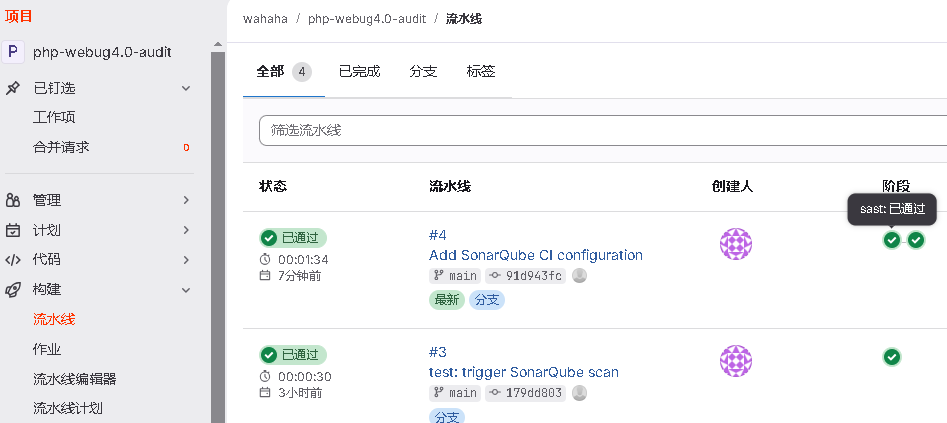
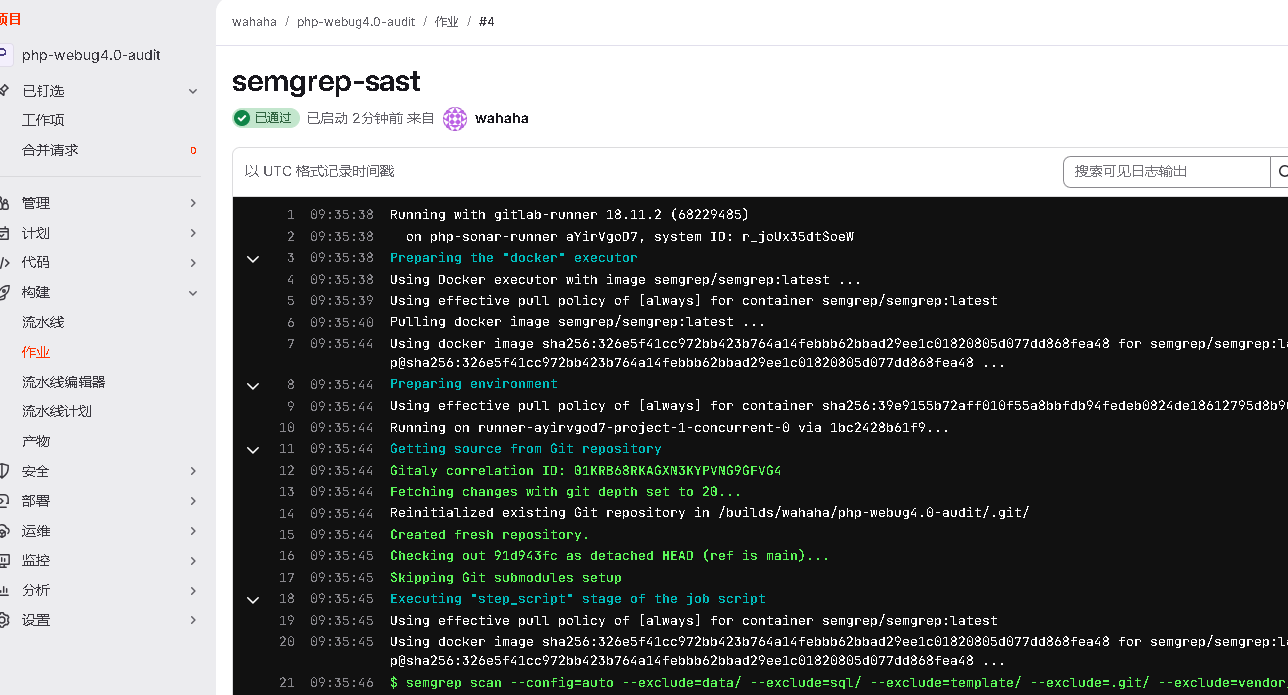
提示 “sast: 已通过”,说明成功实现 DevSecOps 自动化安全审计。
6.3 GitLab Variables 配置(重要)
不要将 SONAR_TOKEN 等敏感信息直接写死在 .gitlab-ci.yml 文件中,否则存在 Token 泄漏风险。
正确做法:
Project
 → Settings
 → CI/CD
 → Variables
添加:
| Key | Value | Flags |
|---|---|---|
| SONAR_TOKEN | sqa_38e2ceb3c6af3ea7b8b0858ad443f0887bbf78c3 | Masked + Protected |
然后从 .gitlab-ci.yml 中删除 SONAR_TOKEN 的硬编码配置,GitLab 会自动注入变量。
七、扫描结果说明
本次在 webug4.0 PHP 靶场 项目中测试,Semgrep 成功检测到:
- SQL 注入(污点分析)
- 文件读取漏洞
- 危险函数(eval、system等)
- Secret 泄漏(如硬编码的 Token)
其中 tainted-sql-string 规则检测效果较好,体现了 Semgrep 数据流分析能力。
八、总结
Semgrep 优势:
- 部署非常简单(Docker 一键拉取)
- 扫描速度快(适合 CI/CD 卡点)
- GitLab CI 集成方便
- 规则开发门槛低,方便二次定制
- 社区规则库开箱即用
Semgrep + SonarQube 组合:
- SonarQube:代码质量、规范度、基础安全热点
- Semgrep:精准深度漏洞检测(SQL 注入、XSS、RCE 等)
两者互补,是一套较为实用的自动化代码审计方案。